
If you’ve ever assembled a client proposal only to juggle eight separate PDF attachments, or tried to archive scanned paperwork and realized half the documents were saved as individual files, you know how messy scattered PDFs can get. They slow down your workflow, make sharing error-prone, and turn simple filing into a chore. A reliable PDF merger takes all those separate documents and combines them into one clean file in the exact order you want — and that’s exactly what we built this tool to do.
MyLuckFile’s PDF merger lets you combine multiple PDF files right in your web browser, with no uploads to remote servers and no software to install. Every step of the process runs locally on your device, so your documents never leave your computer. It’s fast, straightforward, and built from the ground up with document privacy in mind.
Whether you’re putting together business reports, organizing scanned contracts, merging research papers for school, or just tidying up personal files, you can combine as many PDFs as you need without creating an account or waiting for slow server uploads.
Why Merge PDF Files in the First Place?
PDF has become the universal standard for shared documents for one simple reason: it preserves formatting perfectly across every device. What you see on your screen is what everyone else sees, no matter what computer, phone, or operating system they use. But when information is split across a dozen separate PDF files, that convenience quickly turns into clutter.
Merging PDFs into a single document keeps related content together and makes everything more manageable. It helps you:
- Keep full projects, reports, and case files organized in one place
- Share complete document sets without missing pages or forgotten attachments
- Store and back up files more cleanly, with fewer loose items to track
- Prepare documents for printing or formal submission
- Build complete portfolios, applications, and presentation packets
For example, you might need to merge invoices, contracts, and delivery receipts into one file for accounting; or combine application forms, ID scans, and reference letters for a job application. Doing this manually often requires expensive desktop software or uploading files to a service you don’t trust. A simple online merger gets it done in seconds.
Merge Multiple PDFs in Any Order You Want
Our tool doesn’t just stack files together randomly. You can add as many PDFs as you want, then drag and drop them into exactly the sequence you need. The final merged file follows your order exactly, and it preserves the original layout, text, images, and links from every document.
You won’t run into broken formatting, missing pages, or reduced quality — the merge process only combines the files, it never alters their contents.
This works well for all kinds of everyday tasks:
- Merging monthly business reports into one quarterly document
- Combining project plans, specs, and addenda into a single project file
- Joining scanned pages that were saved as separate files
- Building digital portfolios or creative work samples
- Putting together official submissions and application packets
Whether you’re combining two files or twenty, you end up with one clean, organized PDF that’s ready to use right away.
Your Documents Stay on Your Device — No Cloud Uploads
Here’s the problem with most online PDF tools: they force you to upload your files to their server before they do anything with them. For casual files that might not seem like a big deal, but when you’re working with contracts, financial records, personal ID documents, legal papers, or internal business materials, sending files to an unknown third-party server is a real risk.
We built MyLuckFile differently. All the processing happens directly inside your browser, using your device’s own processing power. Your PDF files are read, arranged, and merged right on your computer. They are never sent to a cloud server, never stored on external hardware, and never leave your control at any point.
There’s no account to sign up for, no email required, and no hidden data collection. There’s:
- No cloud upload of any kind
- No server storage of your documents
- No account registration or personal info needed
- No third-party access to your files
For anyone who works with sensitive documents, or just doesn’t like handing their files over to random online services, this isn’t an extra feature. It’s the whole point.
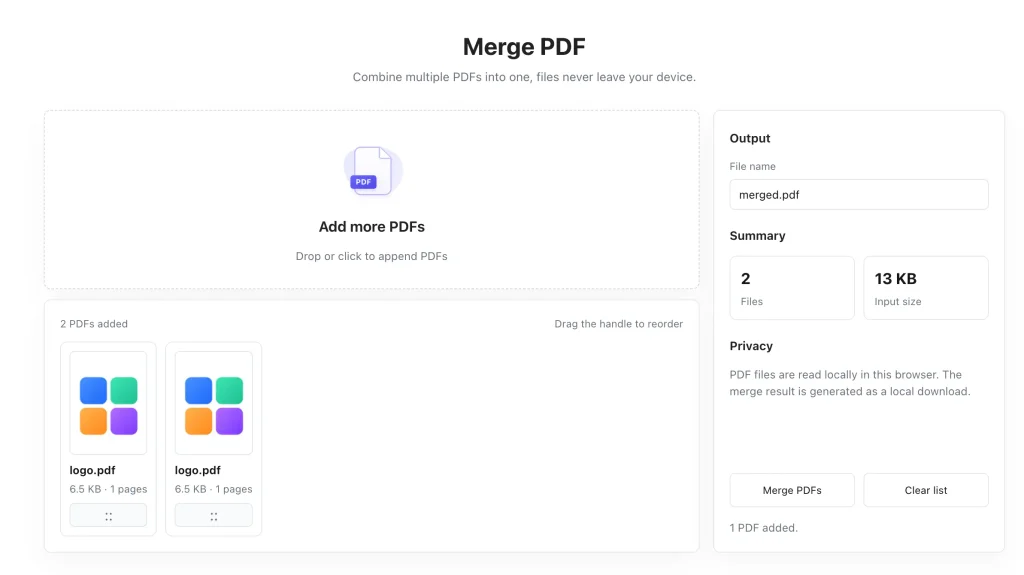
How to Merge PDF Files Online in 3 Simple Steps
You don’t need any technical skills to use this tool. The whole process takes just a few clicks, even for a whole batch of files.
- Add your PDF files Drag and drop your PDFs right onto the page, or click the select button to pull them from your computer or phone. You can add two files or two dozen — it’s up to you.
- Arrange the file order Drag files up or down to put them in the sequence you want. The top file will come first in the merged document, and the bottom file will come last.
- Merge and download Click the merge button, and the tool will combine your files locally on your device. Once it’s done, download the single merged PDF and use it immediately.
Advantages of a Local Browser-Based PDF Merger
Compared to desktop software and traditional cloud tools, a browser-based local merger has several real advantages.
No software installation required You don’t have to download, install, or update anything. It works right in your browser, on any modern computer or phone. No bloatware, no trial periods, no unwanted extensions.
Stronger privacy protection Because files are processed locally on your device, sensitive documents never travel over the internet or sit on someone else’s server. What’s on your computer stays on your computer.
Works across every device Whether you’re on a Windows laptop, Mac, Chromebook, or even a phone, as long as you have a modern browser you can merge PDFs. No platform locks, no compatibility issues.
Fast, simple workflow There are no complicated settings or confusing menus. Add files, arrange them, merge. That’s it. You don’t have to learn new software or sit through tutorials.
When You’ll Want to Merge PDFs
There are dozens of situations where combining PDFs makes your life easier. These are some of the most common ones our users run into.
Business and office work Combine contracts, proposals, invoices, receipts, and supporting documents into one clean file for clients, accounting, or internal records.
School and research Merge research papers, reference materials, notes, and assignments into organized documents for studying, submissions, or group projects.
Personal paperwork Combine scanned certificates, medical records, tax forms, receipts, and ID documents for easier storage and backup.
Sharing and sending A single PDF is always easier to share than a handful of separate files. It reduces the chance of missing attachments and makes everything clearer for the recipient.
Why Use MyLuckFile’s PDF Merger?
There are plenty of PDF merging tools online. Here’s why ours is worth using:
- 100% browser-based, nothing to install — open the page and start merging right away
- Local processing, full privacy — your files never leave your device, no uploads ever
- Batch merging support — add as many files as you want in one go
- Full order control — drag and drop to arrange pages exactly how you want
- Free to use — no paywalls, no watermarks, no hidden limits
- No account required — no signups, no emails, no personal information asked for
We built this tool the way we wish online tools worked: simple, respectful of your privacy, and actually useful. No gimmicks, no upsells, just a tool that does what it says.
Frequently Asked Questions
Is this PDF merger really free?
Yes. You can merge as many PDF files as you want right in your browser, completely free. There are no hidden fees, no watermarks added to your files, and no limits on how many documents you can combine.
Do my PDF files get uploaded to a server?
No. Every part of the merging process runs locally on your device, inside your web browser. Your files are never sent to any remote server, and we never store copies of your documents.
Can I merge multiple PDF files at the same time?
Absolutely. You can add as many PDFs as you need and merge them all in one go. You can also rearrange them into any order before merging.
Does merging PDFs reduce the quality of my documents?
No. The merge process only combines the pages into one file — it doesn’t compress, alter, or degrade the original content. Your text, images, and formatting stay exactly as they were.
Do I need to install software to use this?
No. MyLuckFile works entirely in your web browser. There’s nothing to download, install, or update. It works on every modern desktop and mobile browser.
Scattered PDF files don’t have to slow down your work or clutter up your folders. With the right tool, you can combine all your documents into one clean, organized file in seconds — and you don’t have to sacrifice your privacy to do it.
If you need to merge PDFs quickly, securely, and without the hassle of uploads, software installs, or accounts, give our free online PDF merger a try. It’s ready to use right now, right in your browser.
Merge PDF