
Anyone who has imported photos from a camera or phone has run into sideways images. You take a set of photos, only to find half of them are rotated 90 degrees the wrong way once you transfer them onto your computer. For a single picture you might open a heavy photo editor, but if you have dozens of misoriented JPG or PNG files, correcting each one manually becomes extremely tedious. Plenty of online image rotation tools require you to upload every photo to third‑party servers. This can feel risky when you are working with personal snapshots, business screenshots or brand graphics you would rather not send off to unknown services.
MyLuckFile’s image rotator lets you rotate single or batches of JPG, PNG and WebP images directly within your browser. Every adjustment runs locally on your device. Your images never get sent across the internet to external servers. Rotate photos left or right in 90‑degree increments, preview changes instantly, and export your corrected files. There is no software download required, no account sign‑up, and you can export multiple processed images inside one ZIP archive for batch jobs.
Whether you are fixing sideways phone photos, correcting screenshot orientation, adjusting product images for your store, or preparing graphics for blog content, you can straighten your pictures quickly while keeping your files completely private.
Why Rotate Images Is A Common Daily Task
Camera and smartphone sensors do not always record correct orientation metadata. When you transfer files over to desktop, photos shot vertically often display sideways. This is extremely common with travel photos, scanned documents and screenshots.
Many platforms will not auto‑fix rotated images. Upload a sideways product photo to your online shop or a profile picture to a website, and it will stay tilted. You have to manually correct rotation before upload.
Desktop photo applications work well, yet opening them for a simple rotate operation feels cumbersome, especially when handling multiple files. Most lightweight online alternatives force file uploads, putting private content at risk. A local‑in‑browser rotator solves this exact pain point.
Core Tool Capabilities
This utility keeps functionality focused on real‑world rotation work without bloated extra editing features.
Rotate left and rotate right Turn images clockwise or counter‑clockwise in standard 90‑degree steps. Each click previews the new orientation right on‑screen, so you can see exactly how your final image will look before exporting.
Batch image processing Drop multiple JPG, PNG or WebP files onto the page. Adjust rotation for each individual photo. Once finished, export all processed images in a single ZIP download. You no longer need to save and download every picture one‑by‑one.
Preserve original visual quality Rotation operations adjust image orientation without unnecessary re‑compression artifacts. Your finished photos keep sharpness and detail of the original source files.
Everything runs client‑side. There is no waiting for file upload progress bars. Previews render instantly on your local hardware.
Local‑Only Processing Protects Your Image Privacy
Most web‑based photo editors transmit your images to remote cloud servers for processing. For ordinary public photos this may not raise concerns. But personal family photos, internal business screenshots, brand logos and confidential captured screenshots carry privacy risks when uploaded to outside servers.
MyLuckFile never transmits your images off your computer. All rotation logic executes entirely inside your web browser. Your source files stay stored locally on your device.
- No server‑side upload of your image files
- No external storage of your uploaded photos
- No account creation, no email input required
- Third‑party services cannot access your picture content
Privacy is built‑in core design, not an optional paid feature.
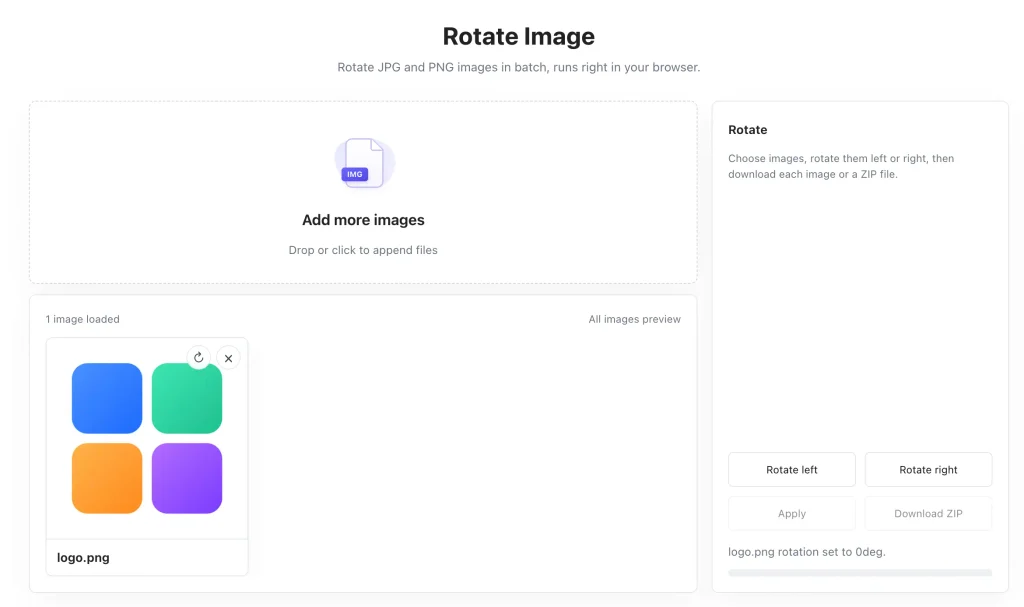
Simple Workflow To Rotate Your Images
No photo editing expertise needed. The workflow stays intuitive even when working with large batches.
- Load your image files Drag and drop JPG, PNG or WebP files onto the interface, or click to pick files from local storage. Thumbnail previews populate once files finish loading. You can add one photo or a whole group at once.
- Adjust image orientation Select each image and use rotate left or rotate right buttons to correct its angle. You can tweak every file separately for batches where some photos need different rotation directions. Preview updates appear immediately.
- Export your corrected images Save single images individually, or use download ZIP to bundle all processed photos into one archive for bulk downloads.
Advantages Of Browser Local Image Rotation
Compared to desktop photo software and traditional cloud‑hosted online editors, client‑side rotation brings practical real‑world benefits.
Zero software installation You do not need to download, install or update desktop photo apps. Open this page with any modern browser and get started immediately. No trial limits, no bundled extra software.
Stronger file privacy Images never travel over the internet. Sensitive personal and business graphics remain only on your own device.
Cross‑platform compatibility Works on Windows, Mac, Chromebook and modern mobile browsers. You are not locked into one specific operating system.
Efficient batch handling Process multiple misaligned photos all in one session, saving you repetitive manual export work.
Real‑World Use Cases
Image rotation comes up constantly across personal and business tasks.
Smartphone and travel photos Fix sideways vacation photos imported from your phone or camera, straighten vertical shots that render horizontally on desktop.
Scanned documents Correct orientation for scanned receipts, forms and paper records before archiving or sharing them with others.
E‑commerce product imagery Straighten product photos before uploading them to online marketplaces, ensuring every listing displays correctly oriented visuals.
Screenshots and documentation Fix tilted screenshots captured from devices, prepare clean graphics for guides, reports and internal documentation.
Content creation for websites Adjust blog images and social‑media visuals so they display properly on web pages.
Why Choose MyLuckFile Image Rotator
Many online rotation tools exist, but few combine batch support with fully local‑only processing.
- Pure browser‑based tool, no software downloads
- 100% local processing; images never get uploaded
- Rotate left and rotate right 90‑degree adjustments
- Full batch processing, export everything inside ZIP
- Supports JPG, PNG, WebP common image formats
- Completely free, no watermarks, no hidden usage caps
- No account registration or personal details required
This tool is built for everyday users. Straight practical functionality, no marketing upsells or gimmicks.
Frequently Asked Questions
Is this image rotator completely free?
Yes. Rotate as many photos as you need inside your browser. There are no hidden charges, no watermarks added to output images and no hard limits on file quantity.
Are my images sent to external servers?
No. All rotation operations run locally on your device. Your original photos never leave your browser, we never receive or store copies of your files.
Can I rotate multiple images at the same time?
Absolutely. Load multiple files, adjust rotation for each photo, then download all finished images packed within one ZIP file.
Will rotating degrade my image quality?
The tool aims to preserve image quality. Repeated rotation cycles can introduce minor compression artifacts, so try to finalize orientation in one pass.
Do I need install any photo software?
No installation is needed. This tool works on any modern desktop or mobile web browser.
You should not need heavy photo editing software just to fix sideways photos, and you should not be forced to upload personal or business images to unknown online servers for simple rotation work. If you want to straighten single or batches of JPG PNG WebP images quickly and keep full control over your files, try our free online image rotator directly in your browser.
Rotate Image