
If you have ever needed to match a photo to strict dimension requirements for websites, profile pictures or product listings, you know how frustrating image resizing can be. Many desktop photo editors are heavy and complicated just for a simple size adjustment, and most online resizing tools force you to upload every picture to remote servers. This can feel risky when you are working with logos, internal screenshots or personal photos you would rather not send to third‑party services.
MyLuckFile’s image resizer handles all size adjustments right inside your browser. Everything runs locally on your device, so your images never get sent out over the internet. You can resize images by exact pixel values or scale them down using percentage values. Batch‑process multiple photos at once, keep your original image quality, and download finished files without signing up for an account or installing any software.
Whether you are preparing product photos for an online store, resizing profile avatars, scaling down screenshots for documentation, or adjusting graphics for your website, you can finish the work quickly while keeping full control over your files.
Why Resize Images In Daily Work
Image dimensions matter a lot for everyday digital tasks. Oversized photos slow down website loading speeds and eat up storage space. Pictures that are too large often fail to upload on forms, marketplaces and social platforms that enforce strict size limits.
Resizing by pixels lets you lock images to exact required measurements. This is essential for e‑commerce product galleries, site banners, and official profile photos where exact width and height are mandatory.
Percentage scaling works great when you just want to shrink an entire batch of photos proportionally. If you have a folder full of large‑sized screenshots, scaling them to 60 % or 40 % can cut file weight drastically without ruining visual appearance.
A proper resizing tool saves you from manual trial‑and‑error. You avoid stretching and distorted pictures, and get images ready for upload immediately.
Two Practical Resize Modes For Different Needs
This tool offers two distinct working modes built for real‑world scenarios, no confusing settings to dig through.
Resize By Pixels Input precise width and height pixel numbers. This is perfect when platforms give you hard dimension rules. For example, store product thumbnails, forum avatars, or website hero graphics all need fixed pixel sizes. You can lock aspect ratio to prevent images from getting stretched out of shape.
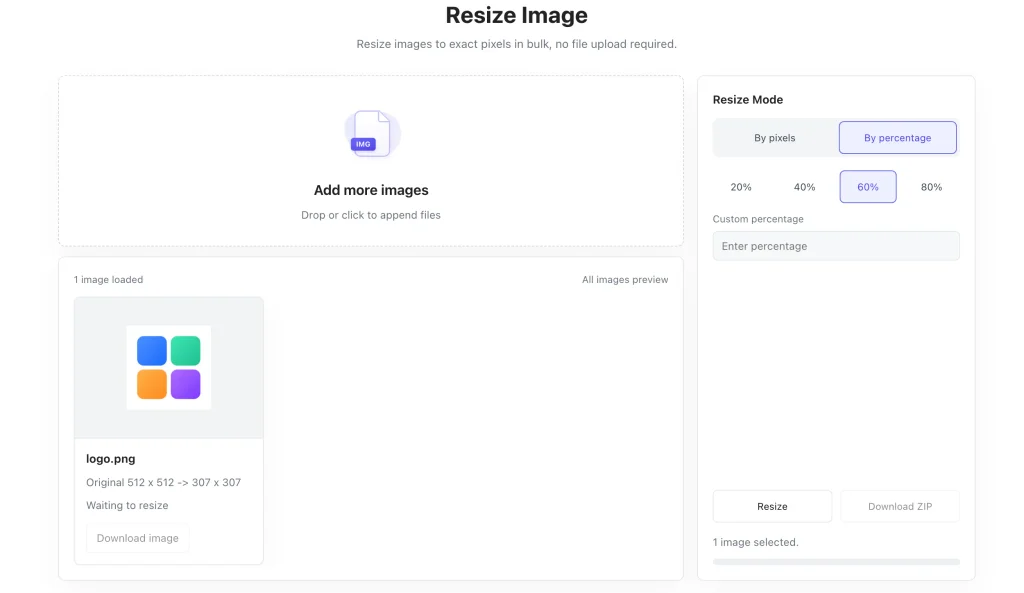
Resize By Percentage Scale whole images proportionally. Quick preset options for 20 %, 40 %, 60 % and 80 % are one‑click away. You can also type in any custom percentage value. This shines for bulk work: shrink dozens of large photos all at the same ratio.
Batch processing is fully supported. Drop multiple JPG, PNG or WebP files onto the page. Apply your resize settings to the whole group, process everything and export all results inside one ZIP archive. You no longer need to open and edit every single file one by one.
Local Processing Keeps Your Images Private
Most web‑based image tools transfer your files to external servers before editing starts. For ordinary public photos this may not cause concern. But business screenshots, brand logos, confidential design drafts and personal ID photos carry real privacy risks when uploaded to unknown servers.
MyLuckFile never moves your images off your computer. All scaling and calculation happens within your browser. Your source files stay stored locally, they are never uploaded, never saved on outside servers.
There is no account creation step, no email input, no hidden data collection.
- No cloud upload of your image files
- No server‑side file storage
- No registration or personal information required
- No third‑party access to your uploaded pictures
Privacy is not an optional extra feature here. It is the core design of this tool.
How To Resize Images Online In A Few Simple Steps
No professional design knowledge is required. The whole workflow is straightforward even when handling batches of files.
- Load your images Drag‑and‑drop JPG, PNG or WebP files to the page, or click to pick files from local storage. You can add one single image or a whole batch together. Preview thumbnails will show up once files load.
- Pick your resize method Choose pixel‑based resizing for fixed exact dimensions, or pick percentage mode for proportional scaling. Use quick percentage presets or fill in your custom value.
- Process and download Hit the resize button. The work runs locally on your device. Save single images separately, or download all processed files packed inside one ZIP file for bulk jobs.
Benefits Of Browser‑Local Image Resizing
Compared with desktop photo software and traditional cloud‑based image editors, running resizing inside your browser brings tangible advantages.
Zero software installation You do not need to download, install or update any desktop application. Open the page inside any modern browser and get started right away. No trial versions, no bundled extra software.
Enhanced file privacy Images never travel across the internet. Everything stays on your own hardware, eliminating risks tied to uploading private material to outside servers.
Cross‑device compatibility Works on Windows, Mac, Chromebook and mobile devices. As long as you run a modern browser you can resize images, locked‑in platform software is not needed.
Streamlined batch workflow Process multiple photos in one session. This cuts down repetitive manual work especially for store owners, content creators and people handling large screenshot collections.
Common Real‑World Use Cases
Resizing images comes up constantly across work, study and personal projects. These are the scenarios our users rely on this tool for.
E‑commerce product images Standardize product photos to match marketplace dimension rules. Uniform image sizes make store pages look clean and consistent.
Website and content creation Scale banners, featured graphics and blog images to fit webpage layouts. Optimize picture dimensions to help improve page loading performance.
Profile pictures and avatars Adjust photos for social media, work accounts and forum profiles to satisfy platform dimension constraints.
Screenshots and documentation Shrink oversized screenshots before inserting them into reports, emails and guides. Reduce file size for smoother sharing.
Personal photo organisation Scale down large camera photos for storage or sharing, without installing heavy photo editing software.
Why Choose MyLuckFile Image Resizer
Numerous online image resizing tools exist, but few combine local‑first privacy with solid batch‑processing capability.
- Fully browser‑based, nothing to download or install
- Local‑only processing, zero server uploads for your images
- Dual resize modes: exact pixels or percentage scaling
- Full batch‑image support, export all outputs as ZIP
- Supports JPG, PNG and WebP common image formats
- Completely free to use, no watermarks, no hidden limits
- No account sign‑up, no personal information requested
We built this utility for everyday users. Practical features without marketing gimmicks or forced upsells.
Frequently Asked Questions
Is this image resizer completely free?
Yes. You can resize any number of images inside your browser for free. There are no hidden fees, no watermarks stamped onto your output images, and no hard limits on file quantity.
Are my images uploaded to remote servers?
No. Every resize operation runs locally inside your browser. Your original images never leave your device, we never receive or store copies of your files.
Can I resize multiple images in one batch?
Absolutely. Load multiple files, apply your resize settings, and process them all together. You can download all finished images in one ZIP package.
Will resizing make my pictures look worse?
When you shrink images down you keep good visual quality. Stretching small images to larger dimensions may produce blurriness, so avoid scaling upward excessively.
Do I need to install software to use this tool?
No extra software installation is needed. MyLuckFile works fully within modern desktop and mobile web browsers.
You should not need complex paid photo software just to adjust picture dimensions, and you should not have to send your private photos to random online servers just to resize them. If you want to adjust image sizes fast, keep your files private, and handle batches efficiently, try our free online image resizer directly in your browser.
Resize Image